Draft Documentation
This guide is currently in development. Content may be incomplete or subject to change.
AI Auditing Module
Monitor conversation quality, review AI-powered evaluations, track agent performance, and gain insights through detailed analytics and drill-down analysis.
In this guide
Module Overview
The AI Auditing module provides comprehensive tools for monitoring and analyzing conversation quality across your campaigns. It uses AI-powered evaluation to automatically score conversations against your defined criteria.
Dashboard
KPIs and summary analytics
Operations
Individual evaluation records
Campaigns
Campaign-level performance
Power BI
Advanced analytics
Accessing the Module
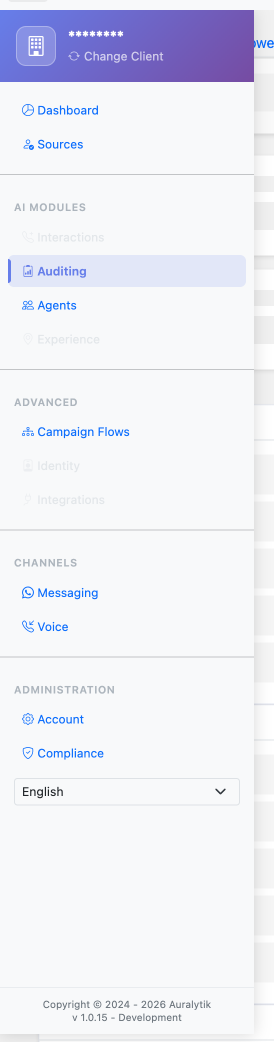
The AI Auditing module is available from the main sidebar navigation. You'll need the appropriate permissions to access this module.
Required permissions: Your user account must have "Auditing" module access enabled. Contact your administrator if you don't see this option.
Steps:
- Log in to your Auralytik dashboard
- In the sidebar, look for the AI Auditing menu item
- Click to open the auditing dashboard
Key Features
Dashboard Analytics
View summary KPI cards showing total interactions, evaluations, critical errors, average scores, and more. Filter by date range, channel, call centers, and campaigns.
Evaluation Pattern Grids
See evaluation scores broken down by campaign, with clickable scores that open detailed performance analysis. Track which evaluation items need improvement.
Reverse Analysis
Click any score to see top performers and executives needing improvement for that specific evaluation item. Get AI-generated recommended actions.
Evaluation Details
Review individual conversations with audio playback, full transcription with clickable timestamps, AI classification results, and detailed evaluation scores.
Dashboard-to-Operations Link
Click "View Operations" from any grid to navigate directly to filtered evaluation records for that campaign, call center, or executive.
Deep Dive Guides
Explore detailed documentation for each aspect of AI Auditing:
Dashboard Overview
Filters, KPI cards, summary grids, and navigation
~8 min read →Operations & Details
Evaluation grid, detail modal, transcription, audio
~12 min read →Campaign Evaluations
Evaluation patterns, items, criteria, and scoring
~10 min read →Reverse Analysis
Top performers, improvement areas, recommendations
~8 min read →Editing Evaluation Scripts
Draft workflow, version history, AI suggestions
~15 min read →Power BI Analytics
Advanced reports and interactive dashboards
~6 min read →Exporting Data
CSV, Excel, and JSON export options
~5 min read →